
Download Floola – iPod, Motorola Mobile Phone, music manager, portable, playlist, podcast, last.fm, USB key, iTunes alternative
Overview
Floola is a specialized utility designed to serve as an alternative to iTunes, specifically tailored for users of iPods and Motorola mobile phones. Its primary purpose is to enable seamless media management directly from a USB key or iPod, eliminating the need to install software on every computer. This makes it ideal for individuals who frequently switch between devices and require consistent access to their music library without relying on proprietary software ecosystems. The application addresses the limitations of iTunes by offering portability, cross-device compatibility, and support for a broader range of media formats.
Target users include music enthusiasts, travelers, and tech-savvy individuals who value flexibility and independence from centralized platforms. The app’s design philosophy centers around convenience and autonomy, allowing users to manage playlists, podcasts, and multimedia content on the go. While the developer, Floola, did not provide additional technical details about their background, the app’s long-standing presence in the market since its release in October 2012 suggests a dedicated user base seeking alternatives to mainstream media tools.
Real-world use cases include managing music libraries during travel, organizing podcasts for offline listening, and maintaining clean, duplicate-free collections. In the broader app ecosystem, Floola occupies a niche as a lightweight, portable solution for legacy devices, offering a rare blend of compatibility and functionality for older hardware. Despite its age, the app remains relevant for users still relying on iPods and Motorola phones with limited software support.
Key Features & Functionality
- Portable Operation: Floola runs directly from a USB key or iPod, requiring no installation on the host computer. This enables users to carry their entire media management environment across different machines, ideal for shared or public computers.
- Multi-Media Support: Beyond music, the app supports podcasts, videos, and integrates with last.fm to deliver personalized music recommendations, enhancing the overall listening experience.
- Playlist Management: Users can create, edit, and organize playlists with intuitive drag-and-drop functionality, ensuring quick access to favorite tracks and curated listening sessions.
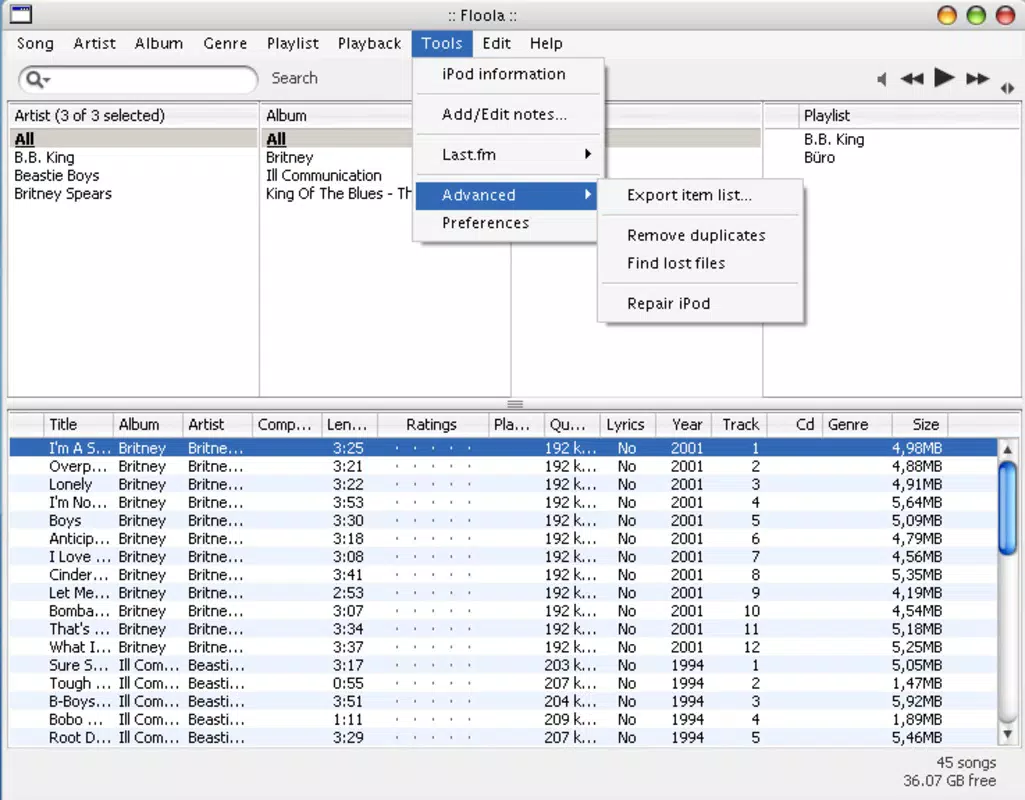
- Duplicate Finder Tool: A built-in feature scans the music library to detect and remove duplicate tracks, helping users maintain a clean, efficient collection and conserve storage space.
- Cover Art Integration: Floola allows users to assign and manage cover art for albums and tracks, enriching the visual presentation of the music library and improving navigation.
These features cater to users who want more control over their media without being tied to a single platform. For instance, a student managing a podcast playlist for daily commutes can easily update content from any computer using the USB key. Similarly, a music collector can use the duplicate finder to streamline a large library, ensuring no redundant files clutter their collection.
Interface, UX & Performance
Floola features a clean, minimal interface optimized for functionality rather than visual flair. The layout prioritizes accessibility, with clearly labeled sections for media libraries, playlists, and settings. Navigation is straightforward, relying on a left-side menu and tab-based organization, which supports efficient workflow for both new and experienced users.
The application’s visual style is functional and dated, reflecting its 2012 release timeline. However, it remains usable across various screen sizes and resolutions. Although the developer did not list formal performance metrics, the app’s small file size of 14.2 MB suggests lightweight resource usage, making it suitable for older or low-spec systems.
Responsiveness is consistent within expected parameters for its era. The app handles media file operations such as playlist creation and duplicate detection with minimal lag. Stability appears reliable based on its long-term availability, though users on modern operating systems may encounter compatibility challenges not addressed in the current documentation. The absence of recent updates raises questions about ongoing support, but the core functionality remains intact for its intended use cases.
Platform Compatibility & Technical Requirements
Floola is designed for the Windows platform and requires a compatible Windows operating system. The specific version or minimum OS requirement was not listed by the developer. The application’s file size is 14.2 MB, which indicates a compact footprint suitable for USB drives and portable storage.
Although the developer did not specify minimum OS requirements, the app’s release date in 2012 suggests it was originally built for Windows XP or later versions. Users on newer Windows systems may experience limited compatibility, especially if the app relies on deprecated APIs or lacks digital signatures for modern security protocols.
Compatibility information was not fully disclosed, and no details were provided about hardware specifications, processor architecture, or peripheral support beyond USB key functionality. As such, users should exercise caution when deploying the app on systems that do not meet its original deployment environment.
Pros and Cons
Pros
- Runs directly from USB key or iPod, enabling true portability across devices.
- Free to download and use, with no licensing or subscription fees.
- Supports multiple media types, including music, podcasts, videos, and last.fm integration.
- Includes a duplicate finder tool to maintain a clean music library.
- Allows cover art management for enhanced visual experience.
Cons
- Released in 2012, with no recent updates or official support.
- Compatibility with modern Windows systems is uncertain.
- Interface design reflects older standards and may feel outdated.
- Developer did not provide technical specifications or system requirements.
- Limited documentation and community support available.
FAQ
Is Floola safe to download and use?
Floola is free and widely distributed through third-party sites. While the app does not appear to contain known malware, users should ensure they download from reputable sources to avoid bundled software or unauthorized modifications.
Can I use Floola on Windows 11 or Windows 10?
The app was released in 2012 and may not be fully compatible with newer Windows versions. Users are advised to test the application on their system before relying on it for critical tasks.
Does Floola require installation on my computer?
No, Floola is designed to run directly from a USB key or iPod without installation, making it ideal for temporary or shared computing environments.
Is Floola still being updated?
There is no indication of recent updates. The last known version was released in 2012, and the developer has not provided any official announcements about future development.
Can I transfer music to my iPod using Floola?
Yes, Floola supports direct management of iPods, including music transfer, playlist creation, and media organization, serving as an alternative to iTunes.
Final Thoughts
Floola remains a unique solution for users still relying on iPods and Motorola mobile phones, offering a rare blend of portability and functionality in a lightweight package. While its age is evident in the interface and lack of updates, its core features—portable operation, multi-media support, playlist management, and duplicate detection—continue to deliver value for niche audiences.
For individuals seeking a free, no-installation alternative to iTunes, especially those managing music across multiple computers, Floola provides a practical, low-overhead tool. Its ability to run from a USB key makes it particularly useful for travelers, students, and anyone needing consistent access to their media library without dependencies.
Despite its limitations, Floola holds historical significance as a pioneer in portable media management. For its target users, it represents a reliable, free tool that continues to fulfill its original purpose.
Download Floola now


